<html>
<head>
<meta name="robots" content="index,follow">
<meta name="keywords" content="">
<meta name="description" content="">
<meta name="google-site-verification" content="7XvecnaOyt_mTjrDULCCRdGyraUWfuBITBztog3ZcNo">
<meta name='yandex-verification' content='725427d0f48fe841' />
<meta http-equiv="Content-Type" content="text/HTML; charset=Windows-1251">
<meta http-equiv="Content-Language" content="ru">
<title>PowerGraph</title>
<link rel="shortcut icon" href="http://www.powergraph.ru/favicon.ico" type="image/x-icon">
<link rel="stylesheet" type="text/css" href="/images/pgraph_noie.css">
<style type="text/css">
<!--
A:link {COLOR:#006666}
A:hover {COLOR:#CC0000}
A.menu:hover {COLOR:#CC0000}
A.menu {COLOR:#000000;FONT-WEIGHT:normal;TEXT-DECORATION:none}
A.tbar_text {COLOR:#ffffff;FONT-WEIGHT:bold;TEXT-DECORATION:none}
A.tbar_text:hover {COLOR:#000000;BACKGROUND-COLOR:#eeeeee}
-->
</style>
</head>

<body bgcolor="#f7f7f7" topmargin="0" leftmargin="0" marginwidth="0" marginheight="0" link="#006666" vlink="#006666" alink="#CC0000" style="margin:2">
<table border="0" marginheight="0" marginwidth="0" valign="top" vspace="0" hspace="0" width="766" height="100%" cellpadding="0" cellspacing="0" align=center bgcolor=#FFFFFF>
	<tr>
		<td align=left nowrap colspan=2 style="border:1px solid #007766" height=64>
		<table border=0 cellpadding=0 cellspacing=2 align=left width=100%><tr>
		<td width=210 align=center><a href="/en/"><img src="/images/logo.gif" border="0" alt="PowerGraph"></a></td>
		<td align=center><a href="/en/soft/"><img src="/images/pgani.gif" alt="PowerGraph Software" border=0></a></td>
		<td align=right valign=top>
			<table border=0 cellpadding=1 cellspacing=2 align=left width=16>
			<tr><td valign=middle>
				<a href="/en/"><img src="/icons/flg_en.gif" alt="English" border=0 title="English"></a>
				</td><td valign=middle>
				<a href="/en/" style="TEXT-DECORATION:none;FONT-SIZE:85%">ENG</a>
			</td></tr><tr><td nowrap>
				<a href="/"><img src="/icons/flg_ru.gif" alt="Russian" border=0 title="Russian"></a>
				</td><td valign=middle>
				<a href="/" style="TEXT-DECORATION:none;FONT-SIZE:85%">РУС</a>				
			</td></tr>
			</table>
		</td>						
		</tr>
		</table>
		</td>
	</tr>
  <tr>  
    <td bgcolor="#eeeeee" bordercolor="#FFFFFF" width="165" valign="top" align=left style="border-left:1px solid #cccccc" nowrap>
<table border=0 cellpadding=2 width="100%" cellspacing=2>
	<tr>
		<td colspan=2 nowrap>		
		&nbsp;<font color=#006666><STRONG>Software</STRONG></font>
		</td>
	</tr>
	<tr>
		<td><img src="/icons/icocheck.gif" border=0></td>		
		<td>
			<a href="/en/soft/" class="menu">About PowerGraph</a>
		</td>
	</tr>
<!--
	<tr>
		<td><img src="/icons/icoview.gif" border=0></td>		
		<td>
			<a href="/en/soft/pgview.asp" class="menu">Описание</a>
		</td>
	</tr>	
-->
	<tr>
		<td><img src="/icons/icosave.gif" border=0></td>
		<td >
			<a href="/en/soft/demo.asp" class="menu">Download...</a>
		</td>
    </tr>
    <tr>
		<td colspan=2 nowrap>		
		<img src="/images/menuline.gif" width=150 height=5><br>
		&nbsp;<font color=#006666><STRONG>Support</STRONG></font>
		</td>
	</tr>
<!--
	<tr>
		<td><img src="/icons/icoforum.gif" border=0></td>		
		<td>
			<a href="/en/support/forum.asp" class="menu">Конференция</a>
		</td>
	</tr>
	<tr>
		<td><img src="/icons/icofaq.gif" border=0></td>		
		<td>
			<a href="/en/support/faq.asp" class="menu">Вопросы и ответы</a>
		</td>
	</tr>
-->
	<tr>
		<td><img src="/icons/icomail.gif" border=0></td>		
		<td>
			<a href="/en/support/mail.asp" class="menu">Send mail</a>
		</td>
	</tr>
	<tr>
		<td><img src="/icons/icosave.gif" border=0></td>		
		<td>
			<a href="/en/support/updates.asp" class="menu">Updates...</a>
		</td>
	</tr>
	<tr>
		<td colspan=2 nowrap>		
		<img src="/images/menuline.gif" width=150 height=5><br>
		&nbsp;<font color=#006666><STRONG>Hardware</STRONG></font>
		</td>
	</tr>	
	<tr>
		<td><img src="/icons/icoadc.gif" border=0></td>
		<td>
			<a href="/en/hard/" class="menu">Supported DAQ</a>
		</td>
	</tr>
	<tr>
		<td><img src="/icons/icofirm.gif" border=0></td>
		<td>
			<a href="/en/hard/links.asp" class="menu">Manufacturers</a>
		</td>
	</tr>
	<tr>
		<td colspan=2 nowrap>		
		<img src="/images/menuline.gif" width=150 height=5><br>
		&nbsp;<font color=#006666><STRONG>Information</STRONG></font>
		</td>
	</tr>
<!--
    <tr>
		<td>&nbsp;</td>
		<td>
			<a href="/en/price.asp" class="menu">Цены и услуги</a>
		</td>
    </tr>
-->
    <tr>
		<td>&nbsp;</td>
		<td>
			<a href="/en/contacts.asp" class="menu">Contact</a>
		</td>
    </tr>
	<tr>
		<td colspan=2>
		<img src="/images/menuline.gif" width=150 height=5><br>
		</td>
	</tr>
<!---
	<tr>		
		<td colspan=2 nowrap>
			&nbsp;<STRONG style="FONT-SIZE:85%">Phone:</STRONG><br>
			&nbsp;+007(495)961-47-30
		</td>
    </tr>
	<tr>		
		<td colspan=2 nowrap>
			&nbsp;<STRONG style="FONT-SIZE:85%">E-Mail:</STRONG><br>
			&nbsp;soft@powergraph.ru
		</td>
    </tr>
-->
	
</table>		     
    </td>  
    <td align="left" valign="top" width="100%" rowspan="2" bgcolor="#ffffff" style="border-right:1px solid #cccccc">		
		<table border="0" cellspacing="0" cellpadding=3 width=605 align=center height=100%>
			<tr>
				<td align="center" valign=top><table border="0">
	<tr> 
		<td align="center">
			<h2>PowerGraph<sup>&reg;</sup></h2>
			<p><strong><font color="#990000">the powerfull software for data acquisition,<br>visualization, processing and analysis</font></strong>
			</p>            
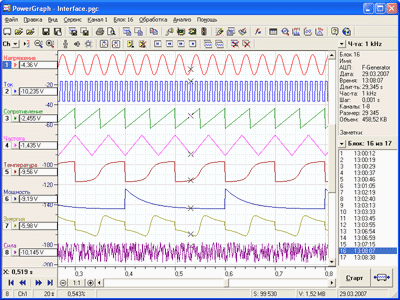
            <p align="center"><A HREF="/en/soft/demo.asp"><img src="/soft/images/pgviewxp.gif" WIDTH="400" HEIGHT="300" border=0 alt="PowerGraph Main Window"></a></p>
		</td>
	</tr>
	<tr>
		<td><p>&nbsp;</p></td>
	</tr>
	<tr>
		<td>
		<h3>PowerGraph<sup>&reg;</sup> Purpose:</h3>
		<ul>
			<li>Data acquisition from various measuring devices.
			<li>Signal logging, visualizing and processing in real time.
			<li>Data editing, mathematical processing and analysis.
			<li>Storing, importing and exporting data.
		</ul>
		</p>
		<h3>PowerGraph<sup>&reg;</sup> Functional Capabilities:</h3>
		&nbsp;<br>
		<STRONG>1. Supporting of data acquisition devices:</STRONG>
		<UL>
			<LI>upgraded driver database including ADC boards and modules, measuring instruments, virtual signal generators, input and sound recording devices;
			<LI>ability to connect new devices and signal sources;
			<LI>support of control structures of the devices (DIO, DAC, etc.).
		</UL>
		&nbsp;<br>
		<STRONG>2. Data Acquisition:</STRONG>
		<UL>
			<LI>preliminary monitoring of input signals; 
			<LI>channel customization and calibration;
			<LI>using any signal measurement units;
			<LI>selecting an arbitrary set of channels for registration; 
			<LI>using any sampling rates (digitization frequency);
			<LI>hardware- and software-based synchronisation of data acquisition (counters, timers, by the signal level recording pre- and post-history);
			<LI>saving and displaying parameters of data acquisition (type of device, date, time, sampling rate and duration of registration); 
			<LI>recording a series of independent data blocks to a single file;
			<LI>adding text marks (comments) to the Chart;
			<LI>inputting and storing text data (notes, footnotes, measurement reports) for each data block and for the whole file.
		</UL>
		&nbsp;<br>
		<STRONG>3. Data Visualization:</STRONG>
		<UL>
			<LI>signal visualization in the chart recorder and oscilloscope modes;
			<LI>efficient system for graphical presentation of a large amount of data;
			<LI>choosing the time format (hours, minutes, seconds, etc.);	
			<LI>selecting an arbitrary set of channels for display; 
			<LI>independent graph positioning and scaling; 
			<LI>changing the colour and style of graphs and the grid.	
		</UL>
		&nbsp;<br>
		<STRONG>4. Data Editing:</STRONG>
		<UL>			
			<LI>selecting any data area for editing and analysis;
			<LI>adding data from other files to the currently open file;
			<LI>changing the order of data blocks in a file;
			<LI>data decimation and averaging by time;	
			<LI>data adjustment with the help of statistical values;
			<LI>graphical editing of individual signal values.
		</UL>
		&nbsp;<br>
		<STRONG>5. Data Processing:</STRONG>
		<UL>
			<LI>extensive library of mathematical and digital functions of signal processing: calibration and adjustment, frequency and amplitude filtering, differentiation and integration, cyclic signal parameter estimation, polynomial calculation, arithmetic and logic operations, trigonometric, logarithmic and other mathematical functions;
			<LI>signal processing in real time; 
			<LI>creation of new channels with calculated data; 
			<LI>unlimited number of intermediate calculations;
			<LI>recording calculation reports for repeated use of complex signal processing algorithms.  
		</UL>
		&nbsp;<br>
		<STRONG>6. Data Analysis:</STRONG>
		<UL>
			<LI>determining signal parameters by graphs with the help of sliding markers; 
			<LI>additional graphical plots: projections, tangent lines, statistics levels and calculated lines;
			<LI>multifunctional spectrum analyzer: plotting various types of spectral graphs, calculating statistical values within specified frequency bands, continuous data registration with spectrum plotting in real time;
			<LI>two-dimensional oscilloscope: plotting graphs of interchannel dependencies, including in real-time mode;
			<LI>histogram of signal distribution by amplitude;
			<LI>library of statistical and informational functions of data analysis.
		</UL>
		&nbsp;<br>
		<STRONG>7. Printing:</STRONG>
		<UL>
			<LI>printing graphs and the grid on a graph paper scale;
			<LI>printing the whole file, an individual block or a selected area;
			<LI>printing several data blocks on a single page or each data block on a separate page; 
			<LI>printing in the independent graph mode, in the grid superposition and graph zero level superposition modes;
			<LI>choosing page elements for printing (file name, X- and Y- axes, titles and parameters of data blocks, text notes);	
			<LI>exporting printed pages in the scalable vector graphics format (metafiles).	
		</UL>
		&nbsp;<br>
		<STRONG>8. Working with files:</STRONG>
		<UL>
			<LI>efficient file format allowing to store data along with various settings, extra text and tables of calculated values;
			<LI>saving and using individual settings for each type of measurement;
			<LI>importing and exporting text files;
			<LI>importing and exporting audio files;
			<LI>importing and exporting binary files;
			<LI>importing and exporting text format data via the Clipboard.  
		</UL>
		&nbsp;<br>
		<STRONG>9. Extra Utilities:</STRONG>
		<UL>
			<LI><STRONG>Digital Voltmeter</STRONG> – 
			designed for displaying numeric values of input signals, allowing you to use your ADC as a standard digital voltmeter. 
			It supports up to 16 digital displays, input signal calibration, single and cyclic measurement modes.
				
			<LI><STRONG>File Recorder</STRONG> – designed for registering signals directly to a file. 
			It allows automatic recording of a series of files synchronized by time, value counter or signal level. 
			It can be used for autonomous data acquisition without operator presence.  
				
			<LI><STRONG>File Viewer</STRONG> - designed for quick viewing and search of files containing analog signals. 
			It allows simultaneous data visualization in the oscillogram and spectrogram modes, data export in text, audio and binary formats, 
			and division of large files into a series of smaller ones with a specified step.  
		</UL>
		
		
		</p>
		</td>
	</tr>
	<tr>
		<td>
			<A HREF="/en/soft/demo.asp">Download PowerGraph Demo...</A>
		</td>
	</tr>    
</table>
	
				</td>
			</tr>			
			<tr valign=bottom>
				<td align=center valign=bottom nowrap>
					<p align=right><a href="#" style="TEXT-DECORATION:none">Back to Top&nbsp;<img src="/images/arrowup1.gif" border=0 align=absmiddle></a>&nbsp; 
				</td>
			</tr>
		</table>
	</td>
  </tr>
  <tr>
	<td bgcolor="#eeeeee" valign=bottom align=center style="border-left:1px solid #cccccc">	
	
	<br>&nbsp;
	</td>
  </tr>

<!--
</table>
<table width="100%" border=0 bgcolor=#007766 cellpadding=5 cellspacing=0>
-->
	<tr height=20>				
        <td align=left nowrap class="small" bgcolor=#007766 colspan=2 height=20>
        <table border=0 cellpadding=0 cellspacing=1>
			<tr><td nowrap>
        &nbsp;<font color=#ffffff>Copyright&copy; DISoft, 2003-2024. All right reserved.</font>
			</tr></td>
        </table>
        </td>        
	</tr>
</table>
<script type="text/javascript">
var gaJsHost = (("https:" == document.location.protocol) ? "https://ssl." : "http://www.");
document.write(unescape("%3Cscript src='" + gaJsHost + "google-analytics.com/ga.js' type='text/javascript'%3E%3C/script%3E"));
</script>
<script type="text/javascript">
try {
var pageTracker = _gat._getTracker("UA-11848721-1");
pageTracker._trackPageview();
} catch(err) {}
</script>
</body></html>